RACKTERM: the terminal built for your phone
A free SSH and web-terminal app for Android. The keyboard never covers your shell, history scrolls with one finger, keys go to the server exactly as typed, and every Linux, tmux and AI hotkey is one tap away in a popup menu.
tech.hankelsner.rackterm · rackterm-1.0.0.apk · SHA-256 80330a51f41040346f16f3b008ffeb8e2e37bbbb4a0b1067670e756c6627d8ee
A terminal laid out for a touchscreen
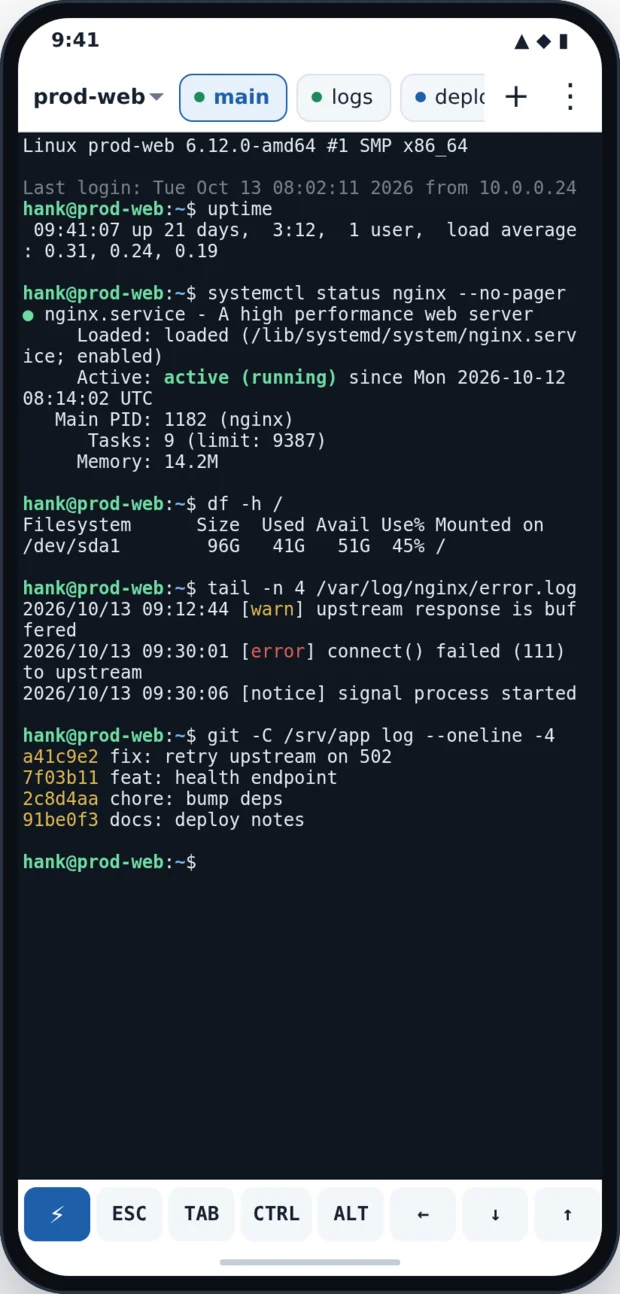
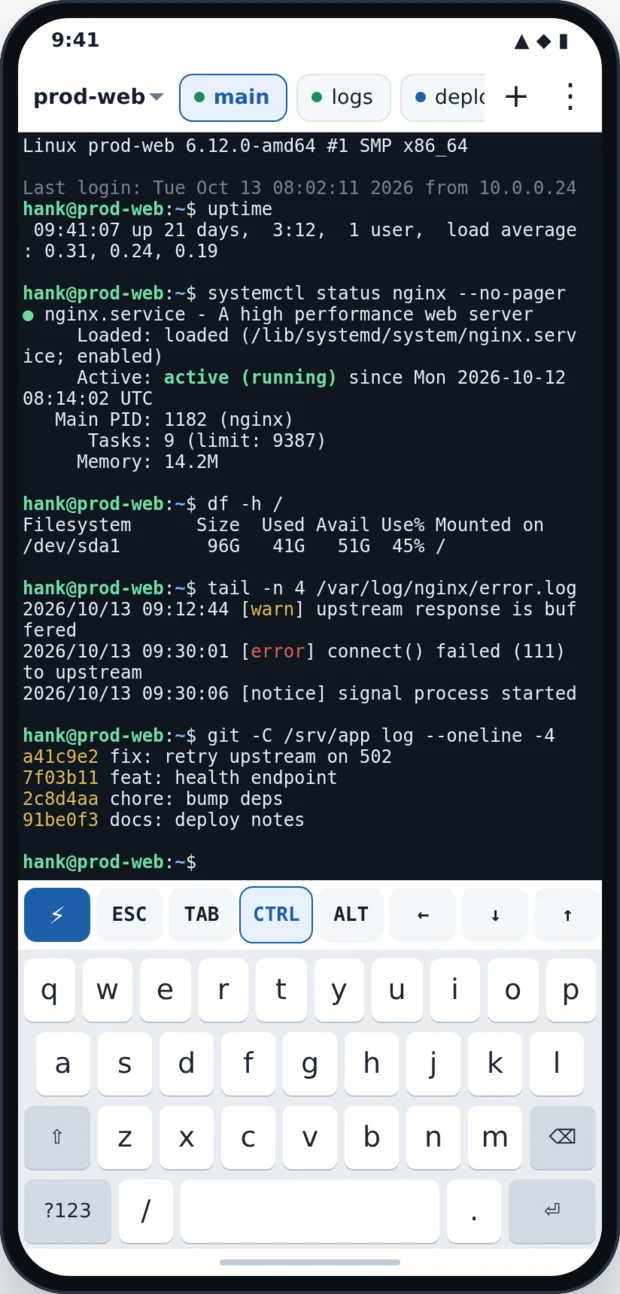
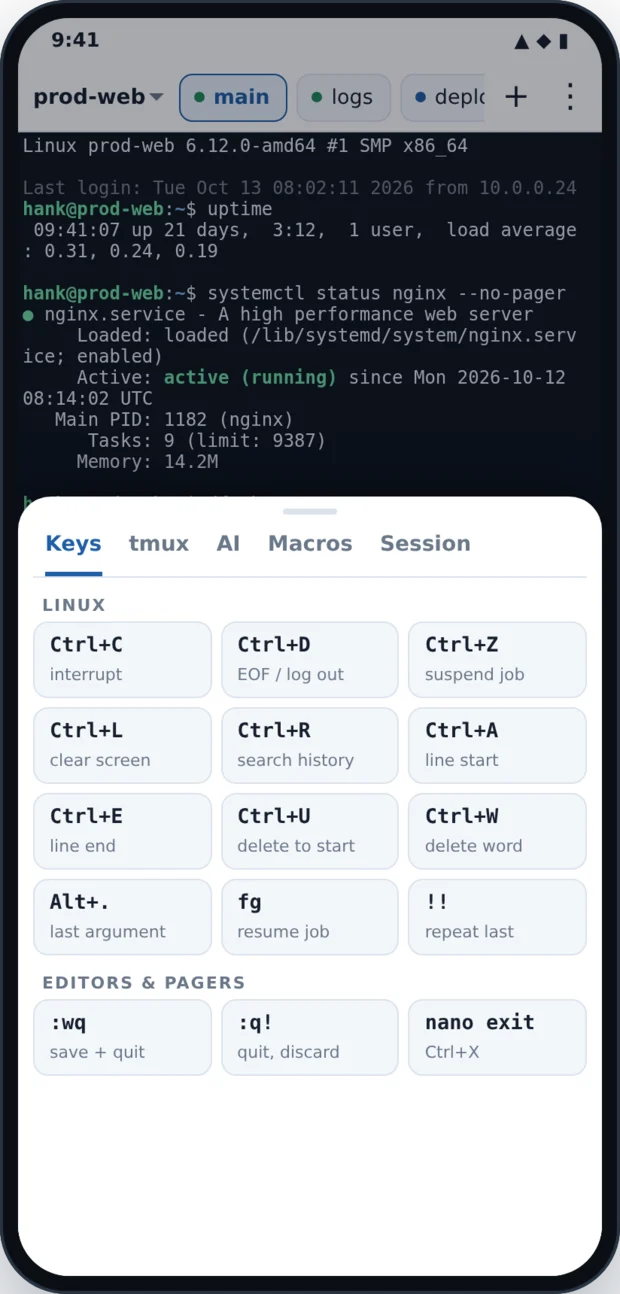
The terminal in these pictures is drawn by the app's own terminal engine; the phone frame around it is an illustration.
The things that make phone terminals painful, fixed
Browser consoles and generic terminal apps break in the same few places on a phone. RACKTERM is designed around exactly those.
The on-screen keyboard slides up over the prompt, so you type blind.
The layout resizes around the keyboard. The terminal re-fits, tells the server its new size, and the prompt stays above the keys.
Autocorrect rewrites commands: doubled letters, whole words re-sent, "sudo" becoming "Sudo".
Keys are sent raw, one keystroke at a time, with suggestions off. A separate compose bar keeps autocorrect and voice typing for when you want them.
Swiping to read history drops tmux into copy-mode and then the keyboard "stops working".
Drag or flick to scroll. Inside tmux, htop or vim it sends real mouse-wheel events; a ▼ LIVE button and typing itself take you back out.
No Esc, Tab, Ctrl, Alt, arrows, or function keys.
A keys row with sticky Ctrl/Alt (tap twice to lock), auto-repeating arrows, plus every combination in the ⚡ menu.
Switch apps for a minute and the connection is gone.
Sessions stay connected in the background, reconnect by themselves, and with tmux reattach to the exact same shell.
Everything in the app
Standard connections
- SSH: server, port, username, password, and/or a private key (ed25519, ECDSA, RSA) with passphrase.
- Web terminals: any ttyd URL, behind HTTP basic auth or a reverse proxy.
- Host keys are trusted on first use, like OpenSSH. A changed key is refused unless you say otherwise.
- Save as many servers as you like and switch between them in one tap.
Sessions that survive
- Name a tmux session and every tab attaches or creates it, so a dropped connection loses nothing.
- Automatic reconnect with back-off, and instantly when the network returns.
- A foreground notification keeps connections alive while you are in another app.
- Multiple tabs per server, each its own shell.
Scrolling that works
- Drag to scroll, flick to fly through 10,000 lines of history.
- Full-screen programs get mouse-wheel reports (tmux, htop, vim) or arrow keys (less, man).
- ▼ LIVE jumps back to the prompt; typing leaves tmux scrollback first.
- Pinch to zoom; long-press to select and copy text from the whole buffer.
The ⚡ popup menu
- Linux hotkeys: Ctrl+C/D/Z/L/R/A/E/U/K/W, Alt+B/F/., F1–F12, Insert, Delete.
- tmux: new and switch windows, splits, zoom, scrollback, detach, with your own prefix.
- Editors: vim save/quit, nano, less.
- AI coding CLI: interrupt, rewind, mode cycle, /clear, /compact, resume.
- Macros: your own one-tap commands, with escapes for keys (
\n,\e,\cC).
AI helper (optional)
- Command: describe what you want and get one shell command, which you can edit, type or run.
- Explain screen: reads what is on the terminal and says what went wrong and what to run next.
- Ask: quick Linux and DevOps answers without leaving the session.
Off until you add your own Anthropic API key. Nothing is ever run without your tap.
Keyboards, real and virtual
- Hardware keyboards: Ctrl, Alt, arrows, Home/End, PgUp/PgDn, F-keys all work.
- Optional: volume-down as Ctrl and volume-up as Alt.
- Compose bar for long lines with autocorrect or voice; long-press Send to insert without Enter.
- Paste uses bracketed paste, so multi-line pastes don't run line by line.
Install the APK
On your phone
- Tap Download APK.
- Open the file. If Android asks, allow your browser to install unknown apps.
- Tap Install, then Open.
- Tap Add a connection: server, port, username, password (or key). Save & connect.
Updates install over the top and keep your saved connections.
Check the file (optional)
The SHA-256 of rackterm-1.0.0.apk is:
80330a51f41040346f16f3b008ffeb8e2e37bbbb4a0b1067670e756c6627d8ee
All published checksums are listed in SHA256SUMS. On a computer: sha256sum rackterm-1.0.0.apk
Connection settings
| Field | What to put there |
|---|---|
| Type | SSH for a normal server, or Web terminal for a ttyd console you open in a browser. |
| Server | Host name or IP (SSH), or the console's URL such as https://console.example.com (web). |
| Port | Leave blank for 22 (SSH) or 443 (web). |
| Username / Password | Your login. For web terminals they're sent as HTTP basic auth. |
| Private key | Optional. Paste it or load a key file; add its passphrase if it has one. |
| tmux session | Optional, e.g. main. Each tab then reattaches the same shell after any disconnect. |
| Terminal path | Web only: the path ttyd is served on, e.g. / or /term. |
Your passwords stay on your phone
- Passwords, keys and the AI key are encrypted with a key held in the Android Keystore, and are excluded from cloud backups.
- The app talks only to the servers you add, plus the AI provider if you turn AI on. There are no analytics, ads, or accounts.
- If the app crashes, the report stays on the phone; you're offered a copy on next launch, and nothing is uploaded.
Questions
Is RACKTERM free?
Yes. No ads, no subscription, no account. The optional AI helper uses your own Anthropic API key, billed by Anthropic to you.
Does it work with any SSH server?
Yes. Any standard OpenSSH-compatible server, with password, keyboard-interactive password, or public-key login (ed25519, ECDSA or RSA keys). Two-factor prompts that need a typed code are not supported yet.
What is a "web terminal" connection?
Many servers expose a shell in the browser with ttyd. RACKTERM connects to it directly (no browser), so you keep the native keyboard handling, scrolling and menus.
Why does scrolling in tmux behave like a desktop terminal?
When a program asks for mouse input (tmux with mouse on, htop, vim), RACKTERM sends it real wheel events, so you scroll that program's own history. If tmux is in scrollback when you type, the app leaves it first so your keys reach the shell.
Will my session survive switching apps or losing signal?
The app keeps connections open in the background and reconnects automatically. Add a tmux session name to the connection and you'll land back in the exact same shell, with running programs intact.
Which Android versions are supported?
Android 8.0 (API 26) and newer, phones and tablets, with or without a hardware keyboard.
Why isn't it on Google Play?
It's distributed directly from this page as a signed APK. Every release is signed with the same key, so updates install over the previous version.
Other apps on this site: all downloads · Hank's Android Torrent Downloader